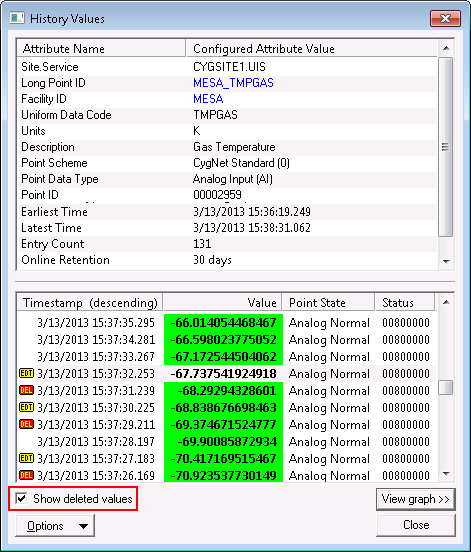
You can manually add history records, edit existing records, or delete records. Adding records is useful to fill in gaps due to missed polls, etc. Editing and deleting are useful for correcting/removing bad data that may be affecting reports and trends (and other places where history data is utilized). Out-of-range and bad data may be the result of bad sensor readings, communication errors, etc.
When you delete a single history record from a point, the record is marked as deleted (DEL flag) but remains in the VHS. You can view deleted records by clicking to enable the Show deleted values option in the History Values dialog box. You cannot "undelete" a record once it has been deleted. You can, however, re-add the value.
When you edit a record, the original record is deleted and the new record is marked as edited (EDT flag).
When you add a new record, either the timestamp or the value must be unique. This is true even if the record you are replacing was deleted. New records are marked as edited.
When you delete a point from the VHS, the point and all of its history records are completely deleted from the VHS (they are not marked as deleted; they are destroyed). If the point is still in the CVS and is configured to report history, records will be added as new updates occur. If the point’s CVS is cycled (stopped and restarted) before an update or the CVS initiates a synchronization with the VHS, the CVS will add the point to the VHS before an update occurs. In such instances, the point will be listed in the VHS but the Entry Count will be 0.
Info items are available to report the number of names marked for deletion (VHS Names Pending Del) and the total number of historical entries marked for deletion (VHS Values Pending Del). When a name is deleted in the VHS, it is marked as deleted and will appear to all users and applications as deleted. A background task is executed to delete all values for the deleted name. See Info Items - Service Specific.
Modifications to history data may be logged to the Audit Service, depending upon the audit level of the VHS. For more information see Auditing.

|
|
|

